
My Experience with upgrading to WordPress V7, using the Full Site Editor and Block Theme
I’ve been following the WordPress V7 development and using it on some of my other less important blog sites as an experiment, training and exploration of features.
Over the last few days I made the push to upgrade the Tempus Fugit blog, my original blog with a fair bit of history, to the V7 RC2 and a Full Site Editor (FSE) block template. The template I’ve chosen is the Twenty Twenty Five template that is currently the most current WordPress provided FSE block template.
The Bumps
The upgrade was not without a few bumps along the way. First up is a backup of everything, I’ve been burned before so now I’m a big backup believer. Also, my hosting service, BlueHost, offers a tool to create a staging site and also push the staging site back up to production. This seems like a good idea and it is also the 1st problem. I click the button to create the staging site and it gets an error 😕.
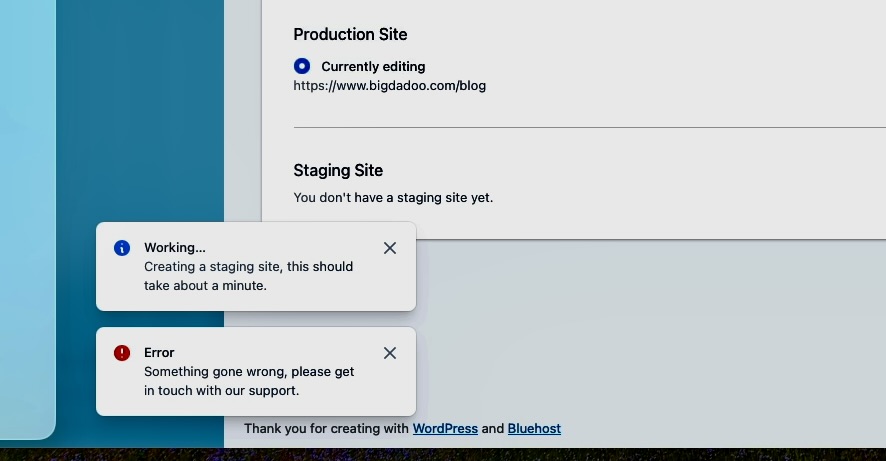
After about 1hr with a support agent in a chat session I learned that because my blog was migrated from a different hosting service it doesn’t have the BlueHost plugin. One of the functions of this plugin is to manage the staging site. Who know? Not me.
Plugin installed and the staging site is created. Basically, it copies all the WP files to a new staging sub-directory (/blog/staging/3706), copies all the database tables to new tables with a “staging” prefix and then adjusts wpconfig to point to the new tables with the staging prefix in the same database.
Next up is to apply the new theme which is quite different from my last theme and then continue to make all sorts of adjustments to use templates, template parts etc. A big part of the work was recreating the menu template part. It’s working, but I’m not too happy with the look just yet. More work ahead.
A couple of big processes left. One works fine and the other, well that took a bit more effort.
WordPress V7 RC2
Moving from WP 6.9.x to WP 7 RC2 required installing the WordPress Beta Tester Plugin plugin and adjusting the settings to “bleeding edge” (yikes!) and pressing the “upgrade” button. Turning back is possible, but probably not that easy. The upgrade works and initial testing is good, nothing seems broken. Some more updating of the staging site and I’m ready to promote it to production.
Going Production
Promoting to production is as simple as a click of a button. The BlueHost plugin should copy all the WP files and SQL tables over the current production content. Sadly, this only sort of works. The file copy is successful but the SQL database import to production fails.
Some Googling w/AI and I learn there are several ways to do this process manually. The number one recommendation is to call Bluehost support since it’s their plugin that failed. So, I take the easier (?) way out and chat with support and they are fairly quick to resolve without too much wait time.
So, we’re up and running. I’m still not quite satisfied with the look and feel. There will be some more tweaking in the days ahead. But for now I’ve made the jump to the current WordPress world.